
CSS TABS – CSS Only “DOM TABS”
September 12, 2007 @ 11:46 am | Comments (38) | by Ross Johnson
While working on my company site redesign, and a new project CSS Uber Clean Gallery I came across a cool CSS trick
There are several variations of “dom tabs” out there, and lets be honest they work pretty well. If a user has javascript everything works as planned, and if not you can read all of the content as all laid out vertically. However you can accomplish the same effect using just CSS, saving you the javascript download and dependency.
What do you need?
So the essentials of any dom tab script include different sections of content some which are hidden, one which is active, and a navigation bar that lets you switch between them.
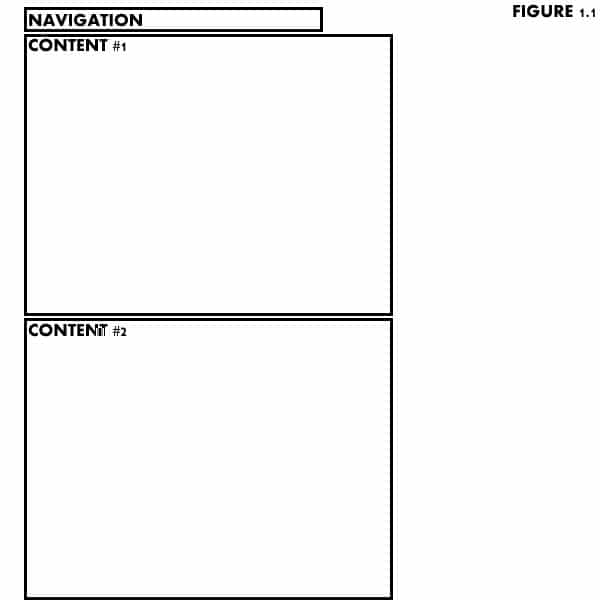
We will keep it simple and start by building our basic structure in HTML (figure 1.1)
<ul id="navigation">
<li><a href="#c1">Content Block 1</a></li>
<li><a href="#c2">Content Block 2</a></li>
<li><a href="#c3">Content Block 3</a></li>
</ul>
<div class="content">
<h1>Heading 1</h1>
<p>Here is some content, I hope that you like it!</p>
</div>
<div class="content">
<h2>Heading 2</h2>
<p>Now that you have read content block 1, you can learn more in this block</p>
</div>
<div class="content">
<h3>Heading 3</h3>
In conclusion, content blocks are fun
</div>
How do we make it work?
So now you have the basic structure of the site and content, but there is a problem; It is just layed out flat on the page, it needs some styling and it needs to hide and show content!
We will start with some basic styling. On comes the CSS:
#navigation { margin: 0 10em 0 0; }
#navigation li { display: inline; padding: 0 5em 0 5em; }
.content { background: #CCCCCC; height: 50em; }
a { color: #0066FF; }
a:hover { color: #00CCFF; }
a:active { font-weight:bold; }
As you can see I styled everything in “em” set a height, and gave the links some function. More on this later…
The nitty gritty
So now we have the structure, we have the styling, we have to get to the functionality. The magic here is a container div set to “overflow: hidden” that is set as the same height of the content blocks. This will cause only one active block of content to be shown at any given time. Then we will give each set of content a named anchor so that the links will jump to that content at any given time (figure 1.2)
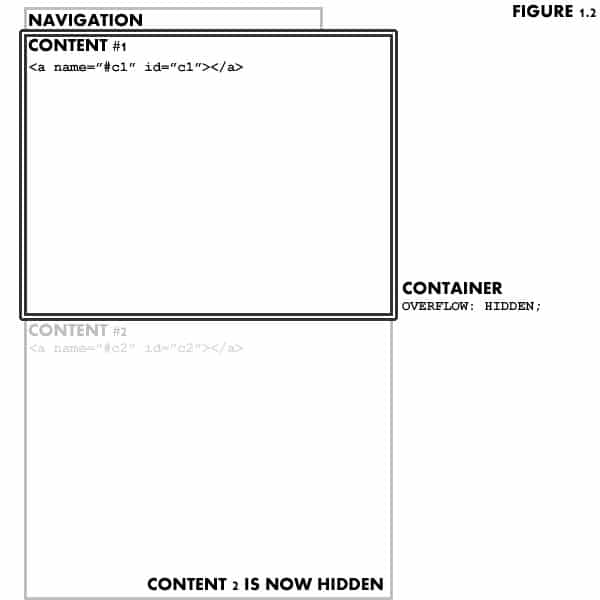
we then add the xhtml:
<div id="container" > ... previous code ... </div>
and the css:
#container { height: 20em; overflow: hidden; }
That is about it! Pros/cons
There you go! Here is an example to see it in action. Feel free to download it and repost it as you would like.
Now there are definite pros and cons to this method. The pros are you are keeping it simple, no need for javascript, it works in all browsers, and is accessible to anyone browsing with out CSS, screen readers, etc.
However there are some con’s. You have to have a set height for the content, meaning you need to know how much (or little) is going to be in each content block. You also have to use EM’s for sizing so that if someone has an elarged font none of the copy will get chopped off. Finally there is no way to highlight the active tab unless you use some sort of javascript.
Want to see a more practical use? Check out my company website. With javascript turned on you get fun prototype slides, however with it turned off you can still navigate through all of the tabs as if you had DOM tabs! Cool no?
« My latest brochure proof Some of us need help writing (me?) »


COMMENT Pedro Rogério
Very good, as I never thought about this before, it is so simple!
Posted on 09/12 1:32pm
COMMENT Dan Shields
Wow, never thought of this either, great post!
Posted on 09/12 4:08pm
COMMENT MarkO
Another problem is that even though you specified the height of the content divs, if the elements inside it are greater than the height it will still overflow.
To solve this, you can hide content if it overflows:
.content {
overflow: hidden;
}
Using
overflow: autowill not work.. It produces nasty bugs.Posted on 09/12 5:35pm
COMMENT MarkO
Another problem is that even though you specified the height of the content divs, if the elements inside it are greater than the height it will still overflow.
To solve this, you can hide content if it overflows:
.content {
overflow: hidden;
}
Using
overflow: autowill not work.. It will produce something not quite good.. ^_^Posted on 09/12 5:35pm
COMMENT Trevor
There’s just one problem. It doesn’t work in Safari 2 for Mac. Love it or hate it, Safari is a legitimate web browser and people should not suffer just because they don’t use Firefox (old machines or short on RAM.)
If a technique is going to be written about, then it needs to work across all major browsers currently in use, or we’re really not that much farther ahead.
Posted on 09/12 6:22pm
COMMENT Ywg
“it works in all browsers”
Well, it does not work on Opera neither on Safari.
The idea is clear and simple, but it sure does need a little more testing.
Posted on 09/13 2:53am
COMMENT PHP Tutorials
I always prefer CSS tabs over tabs generated through javascript. Less chances of breaking. Easy to maintain and modify.
Posted on 09/14 10:53pm
COMMENT craig
I have been working along similar lines for presenting hidden content with CSS. Opera has problems with this idea while Firefox and even IE can process it. Here is one example:
http://www.rumble.sy2.com/emptyhead/xcss/opera_hidden.html
I have also done demos with :target and :hover to bring the content into view, using z-indexing to stack layers of content.
No perfect solution yet…
Posted on 09/15 4:06pm
COMMENT ross
Excellent resource Craig, thanks for the link. It seams we are at a point where theoretically these sorts of techniques should work on all modern browsers, there are a just a few that are lagging behind.
At some point we should get to a point where javascript and css can perform similar tasks, and the question of “presentation vs behavior” should dictate which we use. Seems we are not quite there yet?
Posted on 09/16 1:33am
COMMENT napyfab:blog» Blog Archive » links for 2007-09-17
[...] » CSS TABS – CSS Only “DOM TABS” – Web Design Marketing Podcast & Blog (tags: webdesign css tabs dom tutorial design web tab howto development library menu navigation) [...]
Posted on 09/17 7:40pm
COMMENT Skylog » Blog Archive » links for 2007-09-18
[...] CSS TABS – CSS Only “DOM TABS” (tags: css) [...]
Posted on 09/18 2:19am
COMMENT Website Design
Very nice. Clean and effective. I’d implemented something very similar to this on one of my past projects. I’d never put much thought in to it. I’m going to digg up my old code and mull it over.
Posted on 09/19 12:23pm
COMMENT RUDEWORKS
[...] estúpido. Simplemente jugando con links a selectores y un div con la propiedad overflow: hidden, CSS TABS logra una bonita interfaz de [...]
Posted on 10/02 1:20pm
COMMENT Nachlese September 2007 - Die Seiten des Monats | Nachlese
[...] CSS Only DOM Tabs Ein auf Registerkarten basiertes Navigationsmenü lässt sich ganz elegant auch ohne JavaScript, mit reinem CSS erzeugen. [...]
Posted on 10/09 2:05pm
COMMENT Best of September 2007 | Best of the Month
[...] CSS Only DOM TabsThere are several variations of “dom tabs” out there, and they work pretty well. However you can accomplish the same effect using just CSS, saving you the javascript download and dependency. [...]
Posted on 10/09 2:59pm
COMMENT elv
Another drawback, is that it break the back button, as every tabs is an anchor so each click is saved in the history.
Posted on 10/09 6:20pm
COMMENT lost node » Blog Archive » Best of September 2007
[...] CSS Only DOM TabsThere are several variations of “dom tabs” out there, and they work pretty well. However you can accomplish the same effect using just CSS, saving you the javascript download and dependency. [...]
Posted on 10/09 7:26pm
COMMENT Anes
So easy and simple. Great!
Posted on 10/15 4:45am
COMMENT Bill
I’ve noticed that the browser “Back” and “Forward” buttons don’t work. The URL changes, but it doesn’t move through the content. I’m using Firefox, BTW…
Posted on 11/08 9:44pm
COMMENT 行搏客 » 2007年9月最佳
[...] CSS Only DOM Tabs There are several variations of “dom tabs” out there, and they work pretty well. However you can accomplish the same effect using just CSS, saving you the javascript download and dependency. [...]
Posted on 11/16 12:51pm
COMMENT sanny
I noticed that once you click on the tabs the entire page shifts up or down to depending where you place the tabs in your design to focus on the container.
Any workarounds for that??
Posted on 02/07 5:57pm
COMMENT poss
people have been doing this on vampirefreaks.com for ages.
its bad.
badbadbad.
it doesnt work in Opera >.
Posted on 03/30 10:20am
COMMENT trademark registration
Very nice–clean and effective. I’d implemented something very similar to this on one of my past projects. I’d never put much thought in to it. I’m going to digg up my old code and mull it over.
Posted on 04/05 7:55pm
COMMENT Michael Montgomery
Doesn’t work in Opera 9.5, just released yesterday?
Posted on 06/13 8:59am
COMMENT Website Development. | 7Wins.eu
[...] Databas And Custom Applications. Excerpt from product page Sites you may be interested in CSS TABS – CSS Only “DOM TABS” – Web Design Marketing Podcast & BlogWeb Design Company ABCs: 26 Terms You Need To Know | Ocean Online GroupVitamin Reviews [...]
Posted on 08/03 11:21pm
COMMENT oyunlar
I always prefer CSS tabs over tabs generated through javascript. Less chances of breaking. Easy to maintain and modify.
Posted on 08/29 7:11pm
COMMENT Danh ba web 2.0
Thanks you very much ! I like it
Posted on 09/13 1:46am
COMMENT شات
Very nice. Clean and effective. I’d implemented something very similar to this on one of my past projects. I’d never put much thought in to it. I’m going to digg up my old code and mull it over.
Posted on 09/28 4:28pm
COMMENT A Quick Introduction | StylizedWeb.com
[...] / UX related classes at a local college. I have pioneered various different CSS techniques and tricks, which I write about on my 3.7CREAT.TV blog. I am co-host of the WebAxe podcast, and co-founder of [...]
Posted on 11/12 3:51pm
COMMENT A Quick Introduction | Castup
[...] / UX related classes at a local college. I have pioneered various different CSS techniques and tricks, which I write about on my 3.7CREAT.TV blog. I am co-host of the WebAxe podcast, and co-founder of [...]
Posted on 12/29 2:45pm
COMMENT Thomas
hy thank you for that great tutorial I love the way owerflow is hidden its like u have tabs as layers so when u click on one link the first layer come on top..
now I can use tabed links for my small site with no extra html linked files but I have one problem!!! if class .content and id #container is 40em or higher then 40em when I click on one of 4 links like c1 c2 c3 c4 browser scroll down to the begining of content class so it just scroll a little bit down where you can’t see navbar and that kind of bothers me is it possible somehow to avoid that ?
Posted on 01/05 8:05pm
COMMENT peter
Nice approach!
I’ve seen a X-Browser working only CSS tab version on http://geibi.de/wp
The one shown there is for Wordpress, but you can simply extract the html from the readme an combine it with the .htc and css.
Thank you for that interesting tutorial!
Posted on 01/07 7:28am
COMMENT alessandro
i can’t set a header image..in my css
this is my code for header..
image is named header.jpg
what should i do?
thank in advance.
Posted on 01/10 9:53pm
COMMENT Daily Links | AndySowards.com :: Professional Web Design, Development, Programming, Hacks, Downloads, Math and being a Web 2.0 Hipster?
[...] CSS TABS – CSS Only “DOM TABS” » – Web Design Marketing Podcast & Blog Great look at CSS Only "DOM TABS" (tags: design css navigation dom) [...]
Posted on 03/04 9:07pm
COMMENT CSS Tabs - dom/javascript tab effect with just css : infoeduindia multimedia collection
[...] View Tutorial [...]
Posted on 03/09 7:21am
COMMENT EB
Very nice. I’m working with a learning management system that enables me to upload a slightly customized front page.
This is the 5th tab-nav example I’ve worked with – and the only one that WORKED! All others had some kind of javascript that conflicted with the LMS’ built-in JS functions. I particularly would have liked the slider tab or coda slider (uses the jquery library), but Ross, this code keeps it simple. I’ve yet to see how well it’ll work with my layouts, but I’m happy to see working tabs. Thanks, Ross.
Posted on 03/17 8:52am
COMMENT Ross Johnson
Glad that it worked for your EB. It seems sometimes the simplest way of going about something is also the best. I am a huge fan of sticking with CSS when you can and only involving javascript when it is actually needed.
Posted on 03/17 9:36am
COMMENT Harald Engels
Two other people requested already a solution against the scrolling of the content if you have a bigger site. It would be great to find a fix for that. I spent already 3 hours with this problem but can’t come to a solution. has anyone an idea?
Posted on 07/05 1:36pm